My first www project
world wide web project
Creating your first web project and pushing it to GitHub involves several steps. Here's a basic guide to get you started:
Up Your Development Environment:
Install a text editor or an Integrated Development Environment (IDE) such as Visual Studio Code.
Ensure you have a web browser for testing your project locally.
- Create Your Project Directory:
- Create a new folder on your computer where you'll store your project files.
- Initialize Git in Your Project:
Open a terminal or command prompt.
Navigate to your project directory.
Run the command
git initto initialize a new Git repository in your project folder.
Create Your HTML File:
Use your text editor or IDE to create an HTML file (e.g.,
index.html) inside your project directory.Write some basic HTML code to create the structure of your webpage..
<!DOCTYPE html> <html lang="en"> <head> <meta charset="UTF-8"> <meta name="viewport" content="width=device-width, initial-scale=1.0"> <title>world wide web project</title> </head> <body> <h1>world wide web</h1> <p>The WorldWideWeb (W3) is a wide-area <a href="">hypermedia</a> information retrieval initiative aiming to give universal access to a large universe of documents.</p> <p>Everything there is online about W3 is linked directly or indirectly to this document, including an <a href="">executive</a> <a href="">summary</a>of the project,<a href="">Mailing Lists,Policy</a>, November's <a href="">W3 news,Frequently Asked Questions</a>.</p> <h4> <a href="">What's out there?</a></h4> <p>Pointers to the world's online information, ,<a href="">subjects,W3servers</a>, etc</p> <h4><a href="">Help</a></h4> <p>on the browser you are choosing</p> <h4><a href="">software products</a></h4> <p>A list of W3 project components and their current state. (e.g. <a href="">Line Mode,X11 Viola,NeXTStep,Servers,Tools,Mail robot,Library</a>)</p> <h4><a href="">Technical</a></h4> <p>Details of protocols, formats, program internals etc</p> <h4><a href="">Bibliography</a></h4> <p>Paper documentation on W3 and references.</p> <h4><a href="">people</a></h4> <p>A list of some people involved in the project.</p> <h4><a href="">History</a></h4> <p>A summary of the history of the project.</p> <h4><a href="">How can I help ?</a></h4> <p>If you would like to support the web..</p> <h4><a href="">Getting code</a></h4> <p>Getting the code by <a href="">anonymous FTP</a> , etc.</p> </body> </html>- Test Your Project Locally:
Open your HTML file in a web browser to ensure it displays as expected.
Make any necessary adjustments to your code

- Create a GitHub Repository:
Go to GitHub.com and log in or sign up for an account.
Click on the "+" icon in the top-right corner and select "New repository."
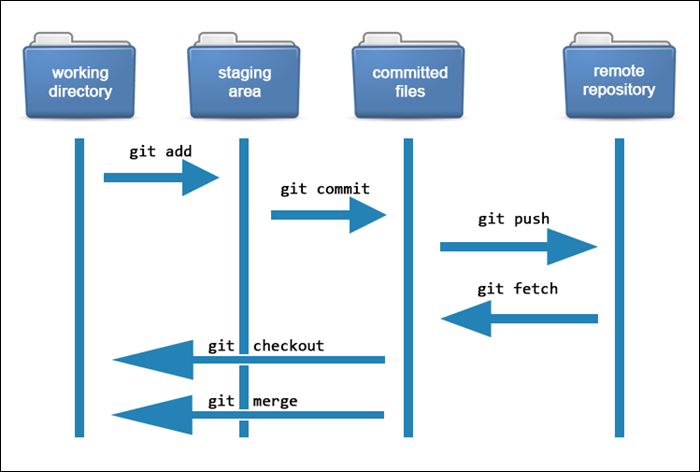
Back in your terminal, add the GitHub repository as the remote origin for your local Git repository:
csharpCopy codegit remote add origin <repository_url>Replace
<repository_url>with the URL of your GitHub repository.Stage your files for commit using
git add .to add all files, orgit add <filename>to add specific files.git config --globaluser.name "Your Name"
to set your account's default identity. Omit --global to set the identity only in this repository.
fatal: unable to auto-detect email address (got 'Lenovo@SERVER.(none)')
to solve it do following commands
git config --global user.email "your email id"
git config --global user.name "username"
After this try git add . and git commit -m "update" again.
4. git remote add origin "link"
5. git push -u origin main
- Push Your Code to GitHub:
Push your committed changes to the remote repository on GitHub:
perlCopy codegit push -u origin masterIf you're working on a different branch, replace
masterwith the name of your branch.
- Verify on GitHub:
Go to your GitHub repository in your web browser and refresh the page. You should see your project files listed there
This is vs code push to github: